
How to Make a Survey
Build one on this page in about five minutes. Describe it and AI drafts the questions, or start blank and write your own. No account needed to start.
Free to use, and nobody you send it to needs an account.
How to make a survey
Three steps from a blank page to answers arriving, using the survey builder above. No design or coding skills needed.
-
Write the questions
Describe your survey in the builder above and AI drafts it, or press Add Question and write your own. Multiple choice, rating scales, ranking, matrix and text are all there.
-
Set who can answer
Anyone with the link, with nothing to sign in to. Turn on Verify Response so one person cannot answer twice, and show one question per screen for phones.
-
Share and read the answers
Publish, then copy the link, print a QR code or embed it in a page. Answers land in your dashboard with a chart per question, ready to filter and export.
Already have Google Forms, Microsoft Forms or Word open? Skip to those steps.
The same job, screen by screen
Every picture below is the real editor at the top of this page, photographed while a customer satisfaction survey was built in it.
-
Draft the questions
Type what the survey is for in the box at the top of this page. The AI writes a first draft: questions, answer options and scale labels. The example on the right took one sentence and about twenty seconds.
Read every line before you send it. A draft is a starting point, not a questionnaire. Delete anything you would not act on, and cut the questions you already know the answer to.
Prefer to write your own? Press Add Question and start typing. Either way the survey saves as you go, and nobody asks for an email address until you want the results.
You do not have to start from a blank page at all. Open one of the free survey templates, change the wording to match your situation, and you are at step three already.
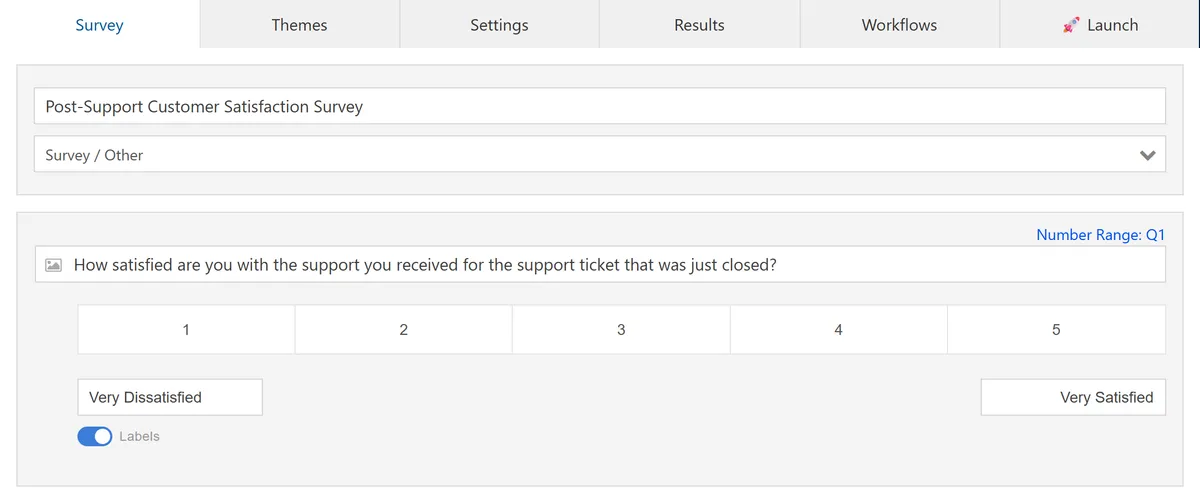
One sentence of description produced a titled survey with labelled scales already set. -
Pick the question type that matches the answer
Add Question opens the type list. Multiple choice and checkboxes for facts, an opinion scale for attitudes, short or long answer for anything you cannot predict.
The Likert presets matter more than they look. Every Likert scale in the list, from Very Poor to Excellent through Disagree to Agree, arrives with both ends already labelled. Unlabelled ends are the single most common reason people read a scale backwards and quietly ruin your numbers.
Keep the positive end on the same side in every question, and use one scale length across the survey. Five points or seven, not both.
Wording is where most surveys quietly go wrong, and it is a longer subject than one step. There are seventy worked examples in the guide to writing survey questions, including the double barrelled and leading ones to avoid.
One ranking question at most. A ranking takes about 25 seconds to answer, roughly five times a rating. Put it in the middle, never at the end.
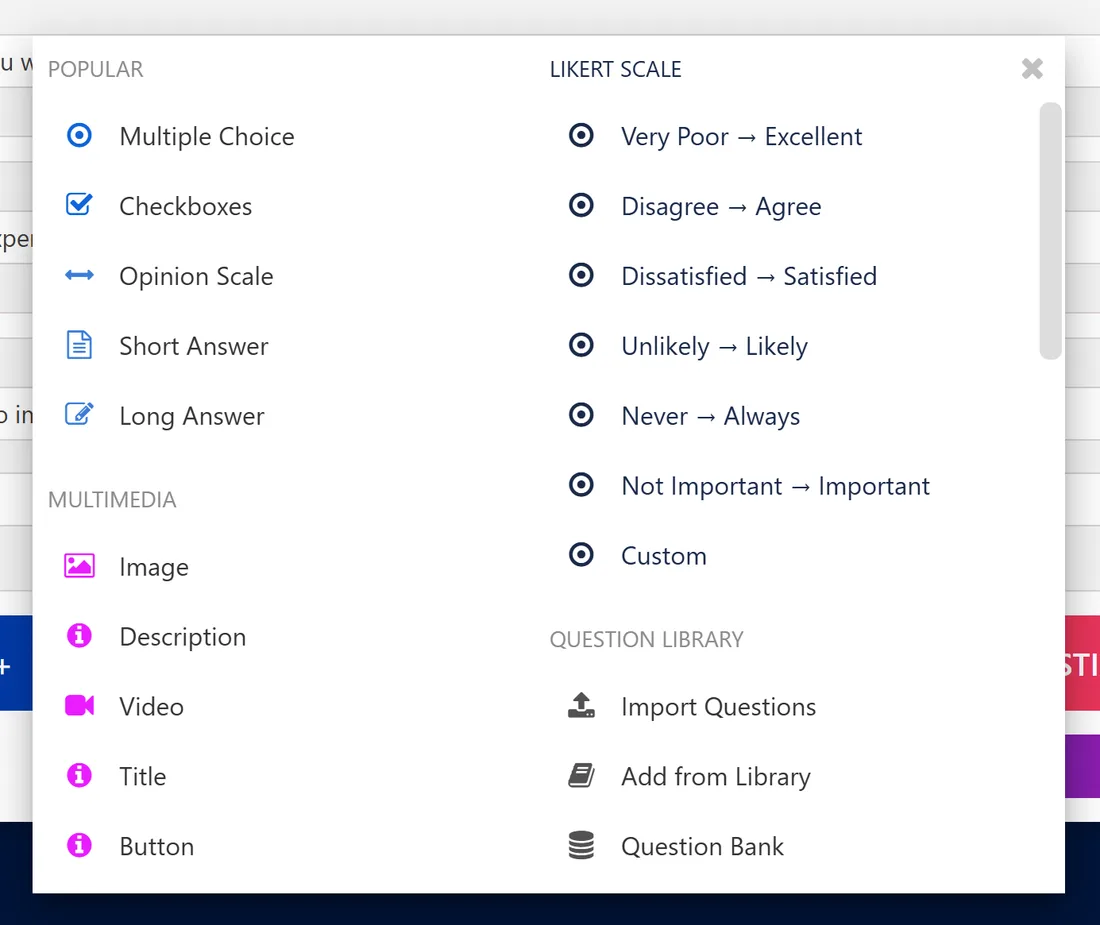
Seven Likert presets arrive with both ends labelled. -
Decide who can answer, and how often
Settings is where a survey stops being a form and starts being evidence. Three switches do most of the work:
- Nothing to sign in to. Anyone with the link can answer. That is the default, and it is why response rates hold up.
- Security and Verify Response asks each person to confirm an email, so one person cannot answer twice. Turn it on for anything you will count. Leave it off for anything sensitive.
- Questions per Page puts one question on each screen, which is what you want on a phone. All at once suits short internal surveys.
Anonymous and confidential are not the same thing, and mixing them up is how trust gets lost. Anonymous means you cannot link an answer to a person at all. Confidential means you can, but access is restricted and you report only totals. Say which one you are running in the first line of the survey.
Then open your own survey on your own phone before you send it to anyone. Three of every four answers arrive on one, and a grid that looks fine on a laptop can be unusable at 390 pixels wide.
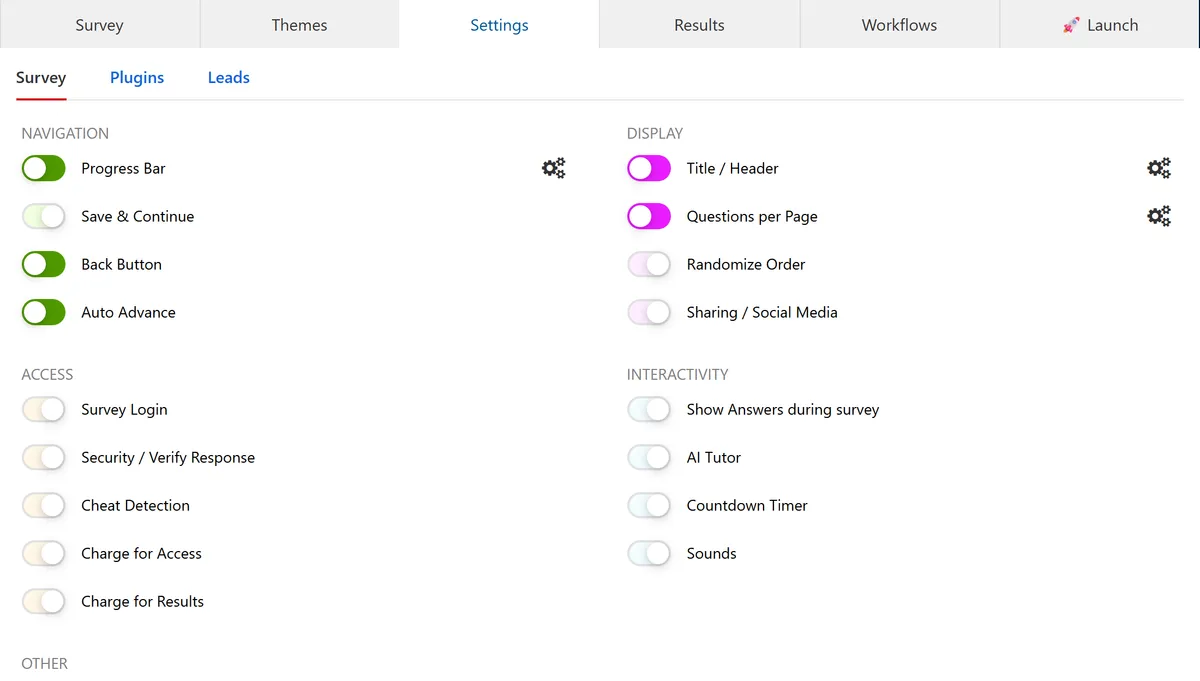
Verify Response is the switch that blocks duplicate answers. 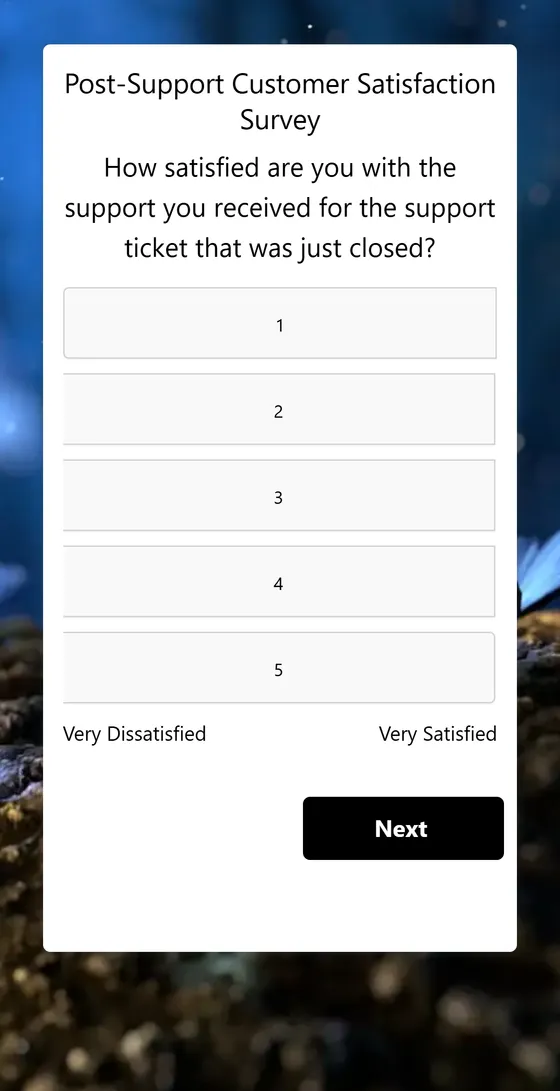
The same question on a phone, where three of every four answers arrive. -
Share one link
Launch publishes the survey and hands you a link that opens for anyone, with no sign-in. Copy it into an email, print the QR code for a room or an event, or embed the survey inside a page on your own site.
Match the channel to the audience. Email when you have a clean list and want to chase the people who have not answered. A QR code for a room, an event or a table. An embed when people are already on your site and you would rather not send them somewhere else.
Before you send it, it is worth knowing how many replies you actually need. A sample size calculator turns the margin of error you can live with into a number of responses, which tells you how many people to invite.
Send once, then remind once, three or four days later. A second reminder rarely earns its annoyance.
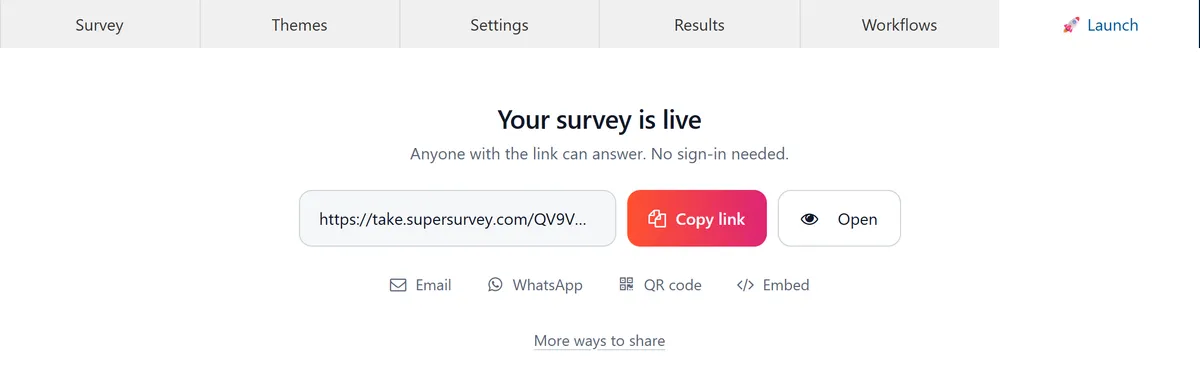
One link, plus a QR code and an embed. Nobody signs in to answer. -
Read the answers, then do something
Every response lands in your dashboard with a chart per question that updates as answers arrive. Filter by any answer to compare groups, for example everyone who rated you 1 or 2, then export the lot to Excel, CSV, HTML or PDF.
Expect them fast: 63 of every 100 answers arrive on the first day, and 86 within a week. If a survey is quiet after seven days, it is finished, not slow.
Then close the loop, which is the step almost everyone skips. Write down the three things you learned, what you are changing, who owns each change and when you will measure again. Asking people for feedback and then doing nothing with it is worse than never asking, because next time they will not bother.
What 2.27 million answers say about the survey you are about to build
We looked at where people stop answering the surveys made here. Six findings that change what you should build, before you build it.
1 in 9
People who finish your survey still skip the last question. One in nine leave it blank and press Submit anyway.
Do this: End on a rating scale or a multiple choice. Never end on a text box or an email field.
44 of 100
Ask for an email address as the last question and 44 out of 100 people will not give it to you.
Do this: If you need an email, ask in the middle and make it optional. 77 of 100 give it that way.
+13%
Required questions collect 13 percent more answers, and people do not quit because of them.
Do this: Make every question required, except the ones asking who someone is.
3 in 4
Three out of four answers come from a phone, whatever the survey is about.
Do this: Open your own survey on your own phone before you send it. Keep matrix grids short.
3.5x
A 20 question survey collects 3.5 times more answers than a 5 question one. Each extra question costs about one finisher in a hundred.
Do this: Ask what you actually need. Just make the first question quick and easy.
Day one
63 percent of your answers arrive on the first day, and 86 percent within a week. After that, very little.
Do this: Send once, then remind people once, three or four days later.
Measured on 25,112 real surveys carrying 2,274,520 answers, built on SuperSurvey between September 2023 and August 2026. Each survey counts once, and surveys are only compared with others of a similar length.
Making a survey in a tool you already have
Most people searching this already have something open. Here is the honest version of each, and the point where it stops being enough.
Google Forms
Open forms.google.com, click Blank form, and give it a name. The round plus button on the right adds a question, and the dropdown beside each question sets its type. Send gives you a link, and Responses holds the answers with a button to open them in Sheets.
Switch when you need a rating scale with more than the two ends labelled, a ranking question, a Net Promoter Score, or your own branding beyond a header image, a colour and a font. Forms is free, so if multiple choice, checkboxes and short text will do the job, stay where you are.
Microsoft Forms
Open forms.office.com and click New Form. Add questions with the plus button, then Collect responses gives you a link and a QR code. It comes with a work, school or personal Microsoft account, and results open straight into Excel.
Switch when you need people outside your organisation to answer without friction, or you want a survey that does not look like an internal form.
Word or Excel
You can build a questionnaire in Word with the Developer tab and tick box controls, or lay one out in Excel. Both work, and both leave you a pile of files to open and count by hand.
Use it only when the people answering genuinely have no internet. If what you actually want is the answers in a spreadsheet, build the survey online and export to Excel at the end. Same spreadsheet, none of the counting.
Instagram or Facebook
A story poll or a Facebook poll is one question, with no export and no way to stop the same person voting twice. It is a good way to get a quick opinion from people who already follow you.
Switch when you need more than one question, a record you can analyse later, or answers from anyone who is not already following you. Post a survey link in the story instead.
None of those quite fit? The free survey creator at the top of this page does the lot in one place: labelled scales, ranking, logic, your branding and a link anyone can open.
Questions people actually ask
How do I make a survey for free?
Use the editor at the top of this page. There is nothing to install and no account needed to start: type a title, add your questions, and publish.
You get as many questions and pages as you need, every question type, skip logic, themes and a share link. The people answering never pay and never sign in either.
Do I need an account?
Not to build a survey, and not to share it. You need one to see the answers, because they have to land somewhere that belongs to you. Create it when you publish, not before.
The people answering never need an account either. Anyone with the link can answer.
How many questions should a survey have?
Fewer than you want, more than you fear. The typical survey built here is five questions and takes 70 seconds.
Length costs less than people think. Going from 5 questions to 20 costs about one finisher in a hundred per extra question, and a 20 question survey still collects 3.5 times more total answers. The real risk is not length, it is a slow first question. Almost everyone who abandons a survey does it on question one or on the last one, and the middle barely matters.
How do I make a survey anonymous?
Leave Survey Login off and do not ask for a name or an email. That is anonymous: nothing in the response can be traced back to a person.
Be careful with two things that quietly break it. An incentive that needs an email address links the answer to the person unless you collect the address in a separate form. And a small team plus a demographic question can identify someone even when no name is stored, so drop team or department when the group is under about ten people.
If you need to know who answered but keep it private, that is confidential, not anonymous. Say the right word in the survey introduction. People can tell when the two are being blurred.
How do I stop one person answering twice?
Turn on Security and Verify Response in Settings. Each person confirms an email address before their answer counts, which blocks the same person voting repeatedly without you having to store who said what alongside their answers.
Nothing blocks a determined person with several email addresses. If the stakes are high enough for that to matter, send individual invitation links instead of one public link.
What is the difference between a survey, a questionnaire, a form and a poll?
A questionnaire is the list of questions. A survey is the whole exercise: who you ask, how you reach them, the questionnaire itself and what you do with the answers. A form collects information from one person at a time and is usually about processing them, like a signup or an order. A poll is a single question, usually public, usually one vote.
In practice people use all four words for the same thing and nobody minds. It only matters when someone hands you a questionnaire and calls it a survey, because the sampling and distribution decisions, which is where surveys usually go wrong, have not been made yet.
Can AI write the questions for me?
Yes, and it is the fastest way to a first draft. Describe what you want to learn in the box at the top of this page, or upload a document or paste a URL, and you get a titled survey with question types and scale labels already set.
Treat it as a draft written by someone who has never met your customers. It will not know your product names, it will not know which question your boss actually needs answered, and it tends to write one question too many. Cut before you send.
How do I send it, and when should I expect answers?
Copy the link from the Launch tab and put it wherever your people already are: an email, a chat channel, a QR code on a table, or embedded in a page on your site.
Then be patient for about a day and no longer. 63 percent of answers arrive on day one and 86 percent within a week. Send one reminder three or four days in, to the people who have not answered, and then stop.
How do I see and export the results?
Answers appear in your dashboard as they arrive, with a chart for every question. You can filter by any answer to compare groups, for example everyone who rated you 1 or 2, and you can get an email alert each time a new response lands.
Export the whole set to Excel, CSV, HTML or PDF whenever you like. Nothing is locked in.
My survey got almost no answers. What went wrong?
Usually one of four things, in this order of likelihood. The first question was slow or nosy, so people left before starting properly. The invitation did not say how long it would take. It arrived from a name nobody recognised, or landed in a spam folder. Or it was sent once, at a bad hour, with no reminder.
Almost never the length. Fix the first question and the invitation before you shorten anything.
Your turn
The editor at the top of this page is live and already loaded. Describe your survey, or press Add Question and write the first one.
Make a surveyFree to start. No account needed until you want the answers.
- How to write survey questions70 examples, and the wording traps that bend your answers
- Questionnaire designSeven steps to questions people can answer honestly
- Sampling methodsWho to ask, how many, and what each method costs you
- Sample size calculatorHow many responses you need for the margin you want
- Statistical significanceTelling a real difference from noise in your results