View/Export Results
Manage Existing Surveys
Create/Copy Multiple Surveys
Collaborate with Team Members
Sign inSign in with Facebook
Sign inSign in with Google

Post webinar survey questions for attendees, no-shows and replay viewers

Ten questions for everybody who watched, live or on the recording, plus a separate four for the people who registered and never turned up. About three minutes. Answer it below, copy any block, or open it in the editor and send the link.

  • 10questions
  • 3 minto complete
  • 24in the copy bank
  • 3audiences it separates
Webinar Feedback Survey · answer to move through it
Use this template
Question 1 of 10 Which audience you are
Did you watch this webinar live, or the recording?
Live, while it was running
The recording, afterwards
Some of both
Question 2 of 10 Which audience you are
How much of it did you watch?
All of it
Most of it
About half
Less than half
Question 3 of 10 The verdict
The webinar was worth the time it took.
1
2
3
4
5
Strongly disagreeStrongly agree
Question 4 of 10 Against what was promised
The webinar covered what the invitation said it would cover.
1
2
3
4
5
Strongly disagreeStrongly agree
Question 5 of 10 In your words
What did you hope to get from this webinar that it did not cover?
Question 6 of 10 How it was run
How was the level of the material for you?
Too basic
About right
Too advanced
Question 7 of 10 How it was run
The presenter explained the material clearly.
1
2
3
4
5
Strongly disagreeStrongly agree
Question 8 of 10 How it was run
The webinar ran for about the right length of time.
1
2
3
4
5
Strongly disagreeStrongly agree
Question 9 of 10 What it was worth
I came away with something I can use in my own work.
1
2
3
4
5
Strongly disagreeStrongly agree
Question 10 of 10 What happens next
I would watch another webinar from this team.
1
2
3
4
5
Strongly disagreeStrongly agree

One registration list, three audiences, and only one of them was in the room

A webinar is signed up for in advance and watched from anywhere, so the list you can email afterwards is bigger than the group who turned up. Three audiences come off one registration and they saw three different things.

Who they areWhat they can tell youWhat they cannotWhich link they get
Watched it liveThe pacing, the level, the questions at the end, and whether the session matched the invitation.How the material reads without the live part.The ten questions on this page.
Watched the recordingThe same questions about the material, plus whether it survives with nobody there to ask.Anything about the chat or the questions at the end, unless the recording carried them.The same ten. Question 1 keeps the two apart.
Registered, never joinedWhy the slot did not work, whether another would have, and whether they still want the recording.Anything at all about the webinar. They did not see it.A separate four-question link.

Question one is the whole design. It asks whether the person watched live or opened the recording, and every answer after it carries that tag, so one link serves two of the three audiences and still comes back readable.

The third audience needs its own link, because it has nothing to rate. Somebody who registered and never joined cannot tell you whether the pace was right. They can say why the slot did not work and whether they still want the recording, which is four questions, not ten.

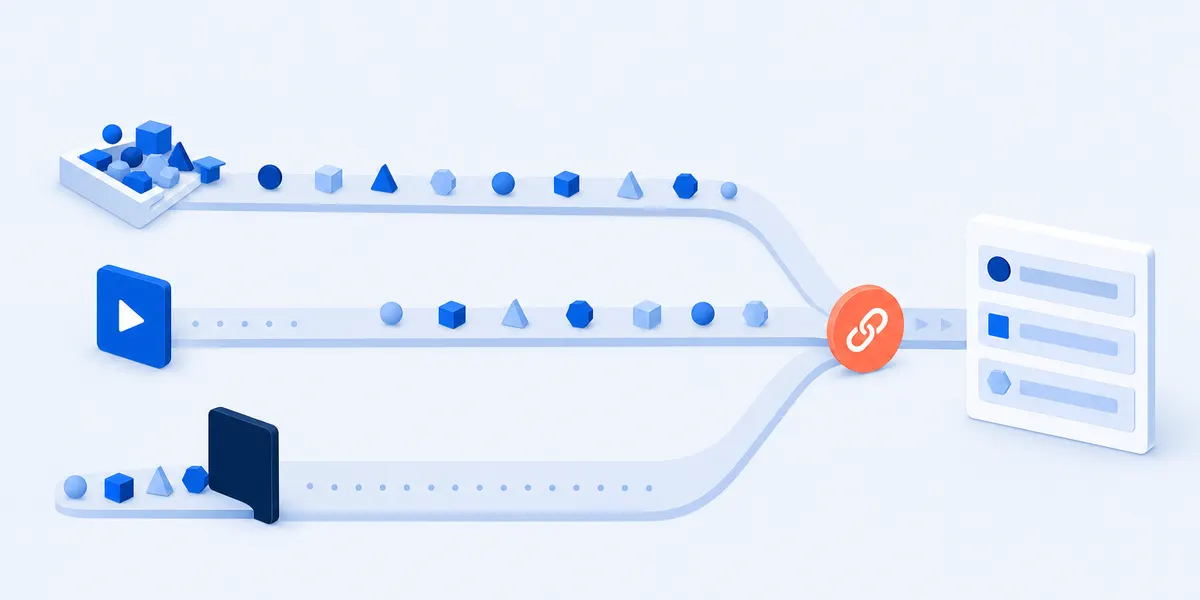
Three tracks running left to right: one flowing freely, one starting from a play button, and one blocked by a closed dark panel, all three converging on a single link marker that opens into a stack of answer bars
Three audiences, three routes, one link. The survey reaches two of them only if it lives somewhere other than the webinar.

If it was not a webinar, four pages fit better. For a conference or a one-day event with an agenda, the event evaluation form asks about the day, not one session. For a standing internal call, the survey after a recurring team meeting is sized for the gap before the next thing. A webinar that was really a training session belongs on the post training feedback questions page. A run of sessions with a syllabus is a course, so use the end of course survey once at the end.

Anything you need to know before the session is a different job: what people want covered and what time suits them belong on a pre event survey, asked while the answers can still change the plan. This one only changes the next webinar.

Why the survey built into Zoom or Webex reaches only one of the three

Not a complaint about the platforms. It is the reason a separate link exists, and both of them document the limit themselves.

Zoom sends its survey to the people who were there. Zoom describes it as scheduled "to be sent to attendees and panelists when the Zoom webinar ends", shown in the browser as the webinar ends or on the follow-up email to attendees.[1] Somebody who never joined is not an attendee, and somebody opening the recording on Thursday is not in a session that ended on Tuesday.

Webex is narrower still, and says so in writing. When the webinar ends its survey "opens for attendees in a browser window", and each link "is uniquely generated for the individual user who attended the Webinar", which the same page says "should not be shared or altered for use by others".[2] Forwarding it is exactly what reaching the other two audiences would take.

Zoom has a field for an outside link, and it is not a workaround. On the webinar Survey tab you can use a third party survey and "enter the link to the survey you want to use".[1] Put your link there and the closing screen carries it. Put the same link in the recording email and in the message to the people who missed it, and one URL has covered all three.

What this site does not do, once. No connection to Zoom, Webex, GoToWebinar or ON24, no reading of attendance, watch time or a registration list, no polling inside the webinar window. It makes a survey that lives at a link, which is why the same link reaches somebody who never joined, and why it misses anybody who shuts the tab the second the webinar ends. That person sees only the closing screen, which is what the third party field is for.

The 10 post webinar survey questions, and what each one is for

Two questions that place the person, one choice about level, six ratings on one 5-point agree scale, one open box. Copy the ten as they stand, or take a block from the three underneath.

Ten questions, and the count is on the page for a reason. The number and the time are printed at the top here and belong at the top of your email. In a web experiment that varied nothing but the stated length, the longer the length people were told about, the fewer of them started and the fewer finished.[3]

One item asks about the presenter, and that is all. Rating a named person on clarity, pace and preparation is a different survey; the speaker evaluation questions are built for it. All ten here are already a working survey, so open them in the free form builder and change any wording that does not sound like you.

Plain text, one question per line, with the answer scale.

The survey: 10 questions, in this order

The whole instrument, for anybody who watched the webinar live or on the recording.

  1. Did you watch this webinar live, or the recording?Choose oneEverything after it arrives tagged with the answer, so the live audience and the replay audience read as two columns rather than one average.
  2. How much of it did you watch?Choose oneA platform counts this for a live session and nothing counts it for a shared recording, so asking is the only way that column exists.
  3. The webinar was worth the time it took.5-point agreeThe one number worth trending webinar to webinar. It says nothing about what to change, which is what the seven items below are for.
  4. The webinar covered what the invitation said it would cover.5-point agreePeople signed up from a description, sometimes weeks earlier. This asks whether the session was the one they signed up for.
  5. What did you hope to get from this webinar that it did not cover?Open text, optionalQuestion five, not question ten: in the same experiment, answers to questions placed later were faster, shorter and more uniform.[3] Sort what comes back into subjects you meant to cover and subjects you did not.
  6. How was the level of the material for you?Choose oneA rating cannot say which direction to move. Three options can, and a split answer means one session is serving two audiences.
  7. The presenter explained the material clearly.5-point agreeOne item about the presenter, and deliberately the only one. It rates whether the material landed, not the person.
  8. The webinar ran for about the right length of time.5-point agreeRead it beside question 2. A high score from an audience that mostly stopped halfway is the right length for the people who stayed and the wrong one for the list.
  9. I came away with something I can use in my own work.5-point agreeSeparates an hour somebody enjoyed from an hour that changed something. A high verdict score with a low one here is a good talk with nothing to take away.
  10. I would watch another webinar from this team.5-point agreeA 5-point attendance question, not a 0 to 10 recommend item, and nothing here turns it into a score. It closes on one tap.

For the people who registered and did not attend (4 questions)

A separate survey behind a separate link, because somebody who never joined has nothing to rate. None of the four asks about the webinar.

  1. What stopped you joining the live session?Choose oneThe one question that changes what you schedule rather than what you say.
  2. Would a different time have made a difference?Choose one: a different time of day, a different day, or noSeparates a scheduling problem from a demand problem, which the question above cannot do alone.
  3. Do you still want to watch the recording?Choose one: yes, already have, or noA yes is the reason to send this with the recording rather than after it.
  4. What would you want covered if you came to the next one?Open text, optionalThe main survey content question, put to people whose reason for missing it may have been the subject.

Swaps for a live session with questions and chat (4 questions)

Only somebody who was there can answer these. Put them on a survey sent to the live list alone, or behind an Answer is rule on question 1.

  1. There was enough time for questions at the end.5-point agreeThe one part of a webinar a recording cannot recreate, so it is the item that says whether the live slot earned itself.
  2. Was your question answered?Choose one: yes, I did not ask, or I asked and it was not answeredThe third option is the one a rating scale hides: somebody passed over is a different problem from somebody who never asked.
  3. Nothing about the audio or the video got in the way.5-point agreeOne obstacle item for the whole platform experience, so broken audio and a frozen slide are the same answer.
  4. I would have got the same out of watching the recording.5-point agreeAgreement is not a bad answer. It names the sessions you could record once and send instead.

Swaps for a webinar that has to qualify (6 questions)

For a webinar run to find out who is worth a call. Put them last, keep them optional, and never open with them: somebody who came for the subject has nothing to answer here.

  1. Which of these describes you best?Choose one, including a prefer not to say optionDoes most of the qualifying in one question, by putting a person in a group rather than asking for a declaration.
  2. How close are you to making a decision about this?Choose one, including not my decision to makeThe option most versions leave out is "not my decision to make", and it stops a call going to the wrong person.
  3. Would you like someone to get in touch about what we covered?Choose one: yes, no, or not yetAsk permission plainly and put it last. A yes is worth more than any rating above it.
  4. What would you want a follow-up conversation to cover?Open text, optionalFor the people who said yes above. It hands whoever calls them an opening line in their own words.
  5. Where did you hear about this webinar?Choose oneThe registration form is the better place for this. If yours asks it, cut this rather than asking twice.
  6. What nearly stopped you registering?Open text, optionalThe only question here about the sign-up rather than the session, and only somebody who registered can answer it.

Do not send all twenty-four. The three blocks under the survey are a separate survey for the people who missed it and two sets of swaps. They replace items or go out alone; they are not one survey.

Two links, where to put them, and how to fold them into one

Two audiences share one survey because question 1 separates them afterwards. The third cannot, so it gets a link of its own.

  1. Send the ten to everybody who watched

    One link, in the thank-you email and again in the message carrying the recording. Those two audiences need one send, not two.

  2. Send the four to the people who did not turn up

    A second link and a shorter survey, in the message that carries the recording. Four questions is what somebody who missed the session can honestly answer, and the only way to learn whether the slot or the subject was the problem.

  3. Put the recording behind the thank-you screen

    The message people see after they submit is yours to write, so put the recording link in it. Answering becomes the route to the replay rather than a favour asked of somebody who already has it.

  4. Paste the link into the platform field, where there is one

    On Zoom that is the third party survey option described above, which puts your link on the closing screen. Webex has no such field, so there the link travels in your own email.

If you would rather have one link than two. Put the audience question first with a third option for "I registered but could not attend", and give it two logic rules in the editor: condition Answer is, action Skip to question, one sending that option to the first of the four missed-it questions and the other sending the rest to question 2. Then put a rule on the last question of the watched branch, condition Always, action End quiz, or that branch runs on into the other. The survey here ships without those rules, so until you add them it is ten in a straight line.

Say who reads the answers, in one line, before question one. Nobody outside the account that made the survey sees them, and no question here asks for a name or an email address.

Reading three audiences apart when the answers come back

Split on question 1 before you average anything. Two columns out of one survey is the point of asking it.

Put the live column and the on-demand column side by side. Where they agree you are looking at the material, because both groups met the same material. Where they disagree you are looking at the format, because that is the only thing that differed. A blended average hides it.

Read the four missed-it answers on their own. They come from people who saw nothing, so folding them in puts ratings of a session beside opinions of people who were not at it.

The open box is the content plan. Question 5 asks what somebody hoped for that was not covered. Sort the answers into subjects you meant to cover and subjects you did not, and the second pile is the title of the next one.

One number to trend, and what it is not. Report question 3 as the percentage who agreed or strongly agreed that the webinar was worth the time, against your own last webinar rather than anybody else's. If a comparable advocacy number is what you were sent to get, the nps score calculator works that out and this survey deliberately does not.

The buying-intent block is one block, not the spine. Marketers run webinars to find out who is worth a call, and the six swaps do that. Keep them last and optional: a survey that opens on budget is a lead form with a rating on top, and the person who came for the subject has nothing to answer in it. If the real question is whether anybody outside your list has heard of you, that is a brand awareness survey questions job rather than this one.

Webinar feedback survey FAQ

How many questions should a post webinar survey have?

Ten for the people who watched, four for the people who did not. Ten fits about three minutes, which is what a follow-up email can reasonably ask for. To go shorter, keep the two questions that place the person, the verdict, the promise item and the open box.

Can I use this survey with Zoom or Webex?

Yes, as a link. Zoom has a field made for it on the webinar Survey tab;[1] Webex does not, so there the link goes in your own follow-up email. There is no integration either way and none is needed, because a survey link is only a URL.

How do I survey people who registered and did not attend?

With a different survey. They have nothing to rate, so the four questions in the second block ask why the slot did not work, whether another would have helped, and whether they still want the recording. Send it with the recording link and read those answers apart from the main set.

When should you send a post webinar survey?

With the recording, rather than on a schedule of its own. The message carrying the recording is the one your list has a reason to open, and the only one that reaches all three audiences at once.

What is a good response rate for a post webinar survey?

No figure published for this carries a method, and no send-window number does either, so this page prints neither. What you control is the ask: state the question count and the time before question one, and put the recording behind the thank-you screen.

Methods and sources

What this template is based on

The three-audience split is a fact about how webinars are attended rather than a finding: one registration produces people who watched live, people who never joined and people who opened the recording. What the page argues from is the documented reach of the platform surveys. Zoom schedules a survey to be sent to attendees and panelists when the webinar ends, and provides a field for a third party survey link;[1] Webex opens its survey for attendees in a browser window, on a link generated for one individual attendee that its documentation says must not be shared.[2] Printing the question count and the completion time before the first question follows a web experiment in which the stated length was varied and nothing else.[3]

Question licensing

There is no published, licensable standard instrument for webinar feedback, which is why every page on this subject writes its own items. All 24 questions here were written for this page and are free to copy, edit and translate. Nothing is reproduced from a vendor template, a university question set or any commercial form.

Limits and disclosure

References 1 and 2 are vendor documentation, quoted for what those products do rather than as independent evidence, and either company may change a feature. Reference 3 is one web survey experiment, quoted for the effect of a stated length rather than as a rule about every questionnaire. The figures widely repeated on this subject, including registration-to-attendance rates, send-window uplifts and lead-generation percentages, are not reproduced because none of them names a method. This template does not integrate with any webinar platform and cannot read attendance, watch time or a registration list.

SuperSurvey makes the editor this template opens in. Everything on this page works with or without it.

References

  1. Zoom Support. Using post-webinar surveys, article KB0066485. support.zoom.com
  2. Webex Help Center. Collect survey feedback after a webinar, article npj02fr. help.webex.com
  3. Galesic, M. and Bosnjak, M. Effects of Questionnaire Length on Participation and Indicators of Response Quality in a Web Survey. Public Opinion Quarterly 73(2), 2009, pages 349 to 360. academic.oup.com

Put the link in the recording email

Ten questions, about three minutes, and one of them says whether the answer came from the live session or the replay. Open it in the editor and send one link.

Use this template