View/Export Results
Manage Existing Surveys
Create/Copy Multiple Surveys
Collaborate with Team Members
Sign inSign in with Facebook
Sign inSign in with Google

Construction Customer Satisfaction Survey Questions

Use these copy-ready construction customer satisfaction questions to spot problems early, protect closeout, and earn repeat work. You will also get milestone timing, role-based routing (homeowner vs owner rep vs end user), and a simple 24-48 hour follow-up workflow your PM and superintendent can run every week.

10
Questions
6 min
Completion Time
4.7
☆☆☆☆☆
2.2k+
Uses
Use This Template Copy & Edit
I am satisfied with the overall construction services provided.
1
2
3
4
5
Strongly Disagree Strongly Agree
Which type of construction project did we complete for you?
Residential construction
Commercial construction
Renovation/Remodeling
Infrastructure
Other
The project was completed on time.
1
2
3
4
5
Strongly Disagree Strongly Agree
The quality of workmanship met my expectations.
1
2
3
4
5
Strongly Disagree Strongly Agree
Communication from the construction team was clear and timely.
1
2
3
4
5
Strongly Disagree Strongly Agree
Pricing and cost transparency met my expectations.
1
2
3
4
5
Strongly Disagree Strongly Agree
How likely are you to recommend our services to others?
Extremely likely
Likely
Neutral
Unlikely
Extremely unlikely
What aspect of our service did you appreciate the most?
Do you have any additional comments or suggestions?
What is your age range?
18-29
30-44
45-59
60 or older
Prefer not to say

Trusted by 5000+ Brands

Trusted by Red Bull, Yale, Apple, Harvard, Shopify and more

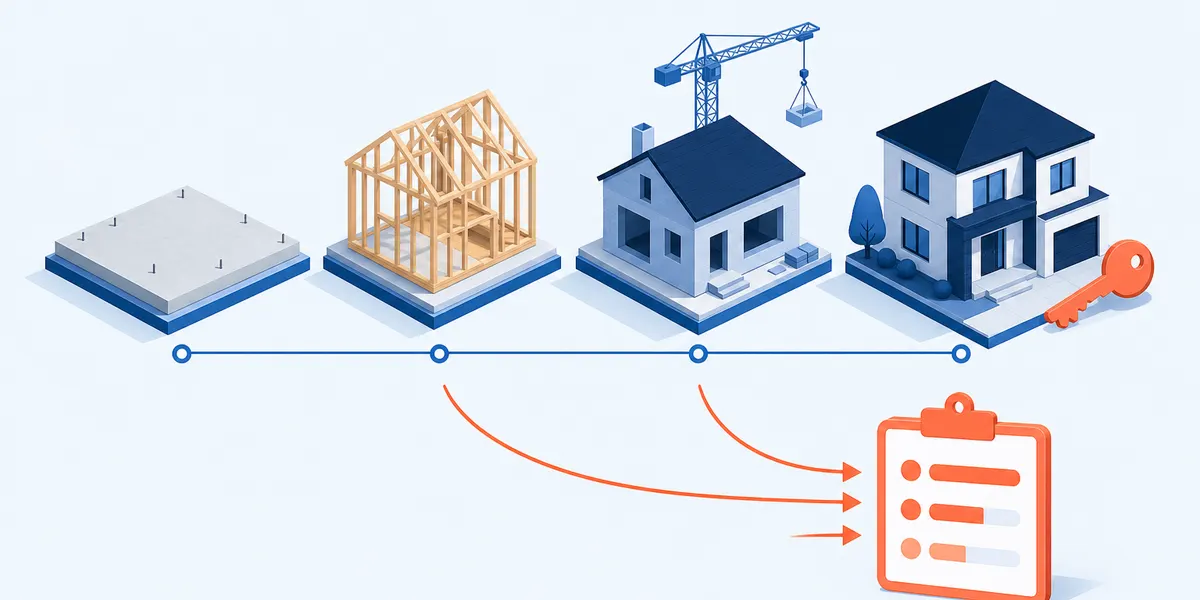
When to Send a Construction Satisfaction Survey (Milestone vs Closeout vs Warranty)

Note: The timing windows below are internal starter targets. Adjust after you establish a baseline for your team (typical inspection cadence, client availability, and response rates).

Milestone pulse (catch issues while you can still fix them)

Internal starter target: send within 24-72 hours of a real milestone. (Example: rough-in signoff, framing complete, first MEP inspection.) Keep it short and driver-focused so your superintendent can act the same week.

Closeout / handover (overall CSAT + referral signal)

Internal starter target: send within 24-72 hours of substantial completion, keys/turnover, or final walkthrough. Use it to confirm schedule and quality, then score your handover package (as-builts, O&M manuals, training, lien waivers).

Warranty / service follow-up (responsiveness and finish quality)

Internal starter target: send 7-14 days after a punch list close, warranty visit, or service ticket completion. Ask about speed, communication, and whether the fix held.

Next, decide who gets the link

  • If one decision-maker owns the relationship: send one link to that person. (Example: homeowner on a remodel; owner rep on a commercial build.)
  • If multiple stakeholders will score you: send separate links (or branch by role) so each person only rates what they observed. Watch out: mixing homeowner + owner rep + end user in one link blurs the results; fix it with role routing.
Timing rule (reduces recall bias)

Send right after the event so feedback stays accurate. If you wait until final payment, you will hear about the last problem, not the whole job -- see recall bias and response bias.

Quick setup

  • Pick your milestone trigger (rough-in, framing, drywall hang, MEP signoff).
  • Decide: one decision-maker link vs role-based links.
  • Internal starter targets: 24-72 hours (milestone/closeout) and 7-14 days (warranty). Tune after you baseline response rates and client availability.

Construction Customer Satisfaction Question Bank (By Phase and Job Type)

Use this section to choose questions fast so you can catch issues early, reduce complaints, and get referrals at closeout. Default: keep each send to 3-5 minutes, then route extra blocks only when they apply. Do this now: pick your phase, pick the respondent role, and turn on routing for change orders.

If you want a bigger library to pull from, start with the construction customer satisfaction survey template and copy the modules you need.

Job-type add/remove menu (pick what applies)

  • Residential remodel: dust control, daily cleanup, neighbor impact, access coordination.
  • New build: selections process, walkthrough clarity, punch list speed.
  • Commercial TI (occupied): schedule coordination, noise/dust, after-hours work, safety communication.
  • Service work: dispatch speed, first-time fix, tech professionalism, parts delays.
  • Large GC: superintendent communication, sub coordination, safety visibility, meeting effectiveness.

Routing plan (use if/then rules)

  • If role = end user/occupant, show cleanliness, access, professionalism; hide change-order pricing fairness.
  • If role = owner rep/facilities, show schedule updates, sub coordination, closeout docs quality.
  • If no change orders, skip the entire change-order block.
  • If project type = service, skip precon questions and show dispatch/arrival questions.
Length guardrail (keeps completion high)

Keep the default version to 3-5 minutes. Kantar summarizes why shorter online surveys hold attention better and reduce drop-off; use that as your rule when you decide what to cut: Kantar guidance on good online survey length.

Precon / project launch questions

"The project scope and inclusions/exclusions were clear before work started."

Why it matters: Scope confusion turns into change-order fights and schedule churn.

When to use: Send after contract/signing or the kickoff meeting.

Likert Segment by: project type, estimator/PM handoff

"Before mobilization, we explained the schedule and what could change it (permits, inspections, lead times)."

Why it matters: Your client judges you on surprises. This sets expectations early.

When to use: Use on all jobs; review trends by PM.

Likert Segment by: role (homeowner vs owner rep), permit complexity

During construction (milestone pulse) -- core drivers

"I receive schedule updates often enough (including what changed and why)."

Why it matters: Weak schedule communication creates escalations and rework.

When to use: Include in every milestone pulse. This is a top driver item.

Likert Segment by: superintendent, PM, phase

"The jobsite is kept safe and professional."

Why it matters: Clients notice housekeeping, signage, and how crews act on-site.

When to use: Best for occupied spaces and residential work.

Likert Segment by: site, trade mix, occupied vs vacant

"Workmanship and installed materials meet the agreed standards."

Why it matters: You need an early warning before punch list gets big.

When to use: Send at major install points (drywall finish, flooring, MEP trim-out).

Likert Segment by: phase, scope type, subcontractor category (if tracked)

Budget and change orders (route only if change orders happened)

"Change orders were explained clearly before approval (scope, cost, and schedule impact)."

Why it matters: Clarity prevents disputes and payment delays.

When to use: Show only if the respondent confirms change orders occurred.

Likert Segment by: role (owner rep vs end user), CO count, CO cycle time

"The change-order process was easy."

Why it matters: This flags friction in approvals, paperwork, and communication.

When to use: Use as a quick health check after any CO-heavy period.

CES-style Segment by: PM, owner rep, CO type (client-driven vs unforeseen)

Punch list / closeout questions

"Punch list items were completed on the timeline we agreed."

Why it matters: Closeout pain is where final impressions get made.

When to use: Send after walkthrough or substantial completion.

Likert Segment by: superintendent, trade category, building area

"Closeout documentation was complete and easy to use (warranties, O&M manuals, as-builts)."

Why it matters: Docs quality drives fewer callbacks and a cleaner final payment process.

When to use: Include for commercial and design-build; shorten for small residential jobs.

Likert Segment by: project type, PM, closeout coordinator

"How likely are you to recommend our company to a colleague or friend?"

Why it matters: This is your referral signal at the moment the job is fresh.

When to use: Use at closeout only. Pair it with 1-2 drivers so you know what to fix.

NPS (0-10) Segment by: PM/superintendent team, job type, closeout experience

Warranty / service questions

"It was easy to request service and schedule the visit."

Why it matters: Friction here creates bad reviews even if the build went well.

When to use: Internal starter target: send 7-14 days after the service ticket closes, then adjust once you see typical callback timing.

CES-style Segment by: service coordinator, trade, response time band

"The issue was fixed correctly the first time."

Why it matters: Repeat visits cost you money and trust.

When to use: Use for warranty and service work; trend by trade category.

Yes/No + comment Segment by: trade, technician/crew, issue type

Open-ended prompts (keep them targeted)

  • Copy/paste this: "What was the biggest win so far on this project?"
  • Copy/paste this: "What is the biggest frustration we should fix right now?"
  • Copy/paste this: "If you could change one thing about our communication, what would it be?"

Use consistent rating questions for drivers, then add 1-2 verbatims. For scaling and wording, use Likert scale examples for construction questions and keep your comment boxes focused with open-ended question prompts. Teams also see better fixes when they tag comments by category (communication, schedule, quality, change orders) because construction satisfaction has multiple drivers; see the summary in research on customer satisfaction in construction.

Quick setup

  • Pick one phase block (milestone, closeout, or warranty) for this send.
  • Turn on routing: role-based blocks + "If no change orders, skip CO block."
  • Keep 6-10 rated items + 1-2 open-ended prompts for the default version.

CSAT vs NPS vs CES for Construction (Which Metric to Use and When)

Use this section to pick one metric per send so you can make the right decision fast: fix an issue, prevent churn, or ask for a referral. Default: CSAT for milestone pulses, NPS at closeout, CES for friction-heavy processes like change orders.

Metric What it measures (what decision it drives) Best timing in construction Use this wording Common pitfalls (and the fix)
CSAT How happy they are right now (who you need to call today). Use it to trigger recovery work. Milestone pulses; post-walkthrough; after a key inspection. "Overall, how satisfied are you with our work to date?" (1-5: Very dissatisfied to Very satisfied). Watch out: vague satisfaction without drivers. Fix: add 1-2 driver items (schedule updates, issue handling).
NPS Referral intent (who will refer you after closeout). Use it to ask for a review or referral. For background on the method, see the original HBR article on NPS: The One Number You Need to Grow. Closeout/handover only; optional 30-day post-occupancy check for commercial. "How likely are you to recommend us to a colleague or friend?" (0-10). Watch out: NPS is not the same as satisfaction. Fix: pair it with CSAT or 1-2 driver questions so you know what to improve.
CES How hard a process felt (what to simplify). Use it to remove friction from change orders, communication, and service scheduling. For background, see the original HBR article that introduced CES: Stop Trying to Delight Your Customers. Right after a high-friction workflow: change-order approval, RFI turnaround, warranty scheduling. "The change-order process was easy." (agree/disagree scale) or "How easy was it to get updates when the schedule changed?" Watch out: using CES as an overall project score. Fix: tie CES to one process and assign an owner to improve it.

Quick setup

  • Pick one primary metric for this send (CSAT for milestone, NPS for closeout).
  • Add 1-2 driver items (communication + schedule updates is a solid default).
  • Use CES only for processes you can actually fix (change orders, service scheduling).

Deployment Playbook: Email vs SMS vs QR Codes (and How to Boost Response Rates)

Use this section to deploy the survey in the right channel so you can get enough responses to act. Default: SMS for milestone pulses, email for closeout, QR for jobsite/packets. Do this now: pick one channel, write the invite in your voice, and set your reminder cadence.

  • Email (best for closeout docs): Use email when you want them at a desk with attachments or links. Example subject: "Closeout feedback for [Project Name] -- quick survey".
  • SMS (best for milestone pulses): Keep it to one sentence + the link. Example text: "Quick check-in after rough-in -- can you rate communication and progress? Please use this link:"
  • QR codes (good for signage and packets): Put a QR in the closeout binder and on a jobsite poster for walk-through day. Label it: "Scan to rate your project -- PM reads every response."
  • Cadence (simple and consistent): Internal starter target: send the invite, then 1 reminder 48-72 hours later. For closeout only, you can add one more reminder around day 7. Stop after 2 reminders total and adjust after you baseline response rates.
  • Sender (who it should come from): Send from the person they know. Commercial: project executive or PM. Residential: owner or PM. Example sign-off: "Reply to me if anything needs attention this week. -- [Name], PM"
  • Anonymity expectations: Do not promise anonymity if you plan to call on low scores. Use this wording: "Your feedback may be used to follow up and resolve issues."
  • Response rate reporting (stay consistent): Use a standard definition for "sent," "delivered," "complete," and "partial" so your PMs do not game the numbers. AAPOR outlines standard outcome rate definitions you can adopt: AAPOR standard survey outcome rates.

Quick setup

  • Internal starter target (milestone): SMS invite + 1 reminder 48-72 hours later.
  • Internal starter target (closeout): email invite + reminders at ~72 hours and around day 7 (max 2 total).
  • Update the sender name to match the relationship (PM/superintendent vs project executive).

Close-the-Loop Workflow for Construction Teams (Triage, Ownership, Follow-Up)

Use this section to turn scores into action so you can prevent escalations and protect referrals. Internal starter target: contact low scores within 24-48 hours, then adjust after you establish a baseline for your team and client expectations. Do this now: set triage rules, assign owners, and track fixes by category.

  1. Auto-tag every response (so you can route it fast)
    Tag by phase (milestone/closeout/warranty), PM, superintendent, and project type. If you track it, tag the main category involved (communication, schedule, quality, change orders, closeout docs).
    Example: "Closeout | PM: J. Rivera | Super: K. Smith | Category: punch list".
  2. Triage by score band (set your SLA)
    Use simple bands your team can remember.
    • Low CSAT (1-2) or NPS detractor (0-6): internal starter target: call within 24-48 hours (adjust after you baseline).
    • Neutral (CSAT 3) or NPS passive (7-8): internal starter target: follow up in 3-5 days with one specific improvement.
    • High (CSAT 4-5) or NPS promoter (9-10): ask for a testimonial, review, or referral after you confirm closeout is complete.
  3. Turn issues into tasks (one owner, one due date)
    Convert each problem into a trackable task. Assign an owner (PM, superintendent, service coordinator) and a due date.
    Example task: "Provide revised 3-week lookahead and explain inspection delay -- Owner: PM -- Due: Friday 3pm".
  4. Confirm resolution with the client (close the loop)
    Follow up after the fix. Use one short message: what you did, when it was done, and what happens next.
    Example: "We completed the punch list items in Areas A and C today. Please reply if anything is still open so we can address it this week."

Lightweight reporting your ops team will actually use

  • Track trends over time by phase and by PM/superintendent team. Do not manage from one-off averages.
  • Pair the primary metric (CSAT or NPS) with 1-2 drivers (communication, schedule updates, change-order clarity).
  • Review weekly in the PM/superintendent meeting: top 3 issues, owners, and due dates.

Quick setup

  • Create tags: phase, PM, superintendent, category.
  • Write your triage SLA into the template (example internal starter target: low score = 24-48 hour call).
  • Add one "owner" field and one "due date" field to your internal task log.

Frequently Asked Questions

How long should a construction customer satisfaction survey be?

Internal starter target: keep milestone pulses to 3-5 minutes so people finish on a phone between meetings. For closeout, you can go slightly longer if you need documentation and punch list feedback, but keep extra sections optional. Do this now: use routing so you do not ask every category on every job.

Who should receive the survey on a commercial construction project?

Send it to the people who live with the outcomes: owner rep, facilities manager, property manager, tenant rep, and sometimes end users. Do not send one link to everyone; use separate links or role-based branching so each group only rates what they actually saw. Example: end users can rate cleanliness and access, but they should not rate change-order pricing fairness.

Should responses be anonymous or named?

Use named responses when you plan to follow up and fix issues. Use anonymous responses when you want more candid feedback on professionalism or communication dynamics and you do not need to call back. Do this now: add one sentence to the invite that matches your intent (either "we may follow up" or "responses are anonymous").

What is the best scale to use for construction satisfaction questions (1-5, 1-10, or Yes/No)?

Default to a 5-point satisfaction agreement scale for driver items because it gives you usable spread without overwhelming people. Use a 0-10 scale only for the NPS recommendation question, and keep scales consistent inside each section. If you want examples you can copy, use Likert scale examples for construction questions and the guide on rating scale questions.

How do I use CSAT, NPS, and CES together without over-surveying?

Pick one primary metric per send: CSAT for milestone pulses and NPS at closeout. Add CES only when you are testing a specific high-friction process like change orders or warranty scheduling. Watch out: NPS is not a satisfaction score; fix it by pairing NPS with 1-2 driver questions (communication and schedule updates are a strong default).

What should we do when we get a low score right before closeout?

Run an internal starter-target recovery play: acknowledge the score, confirm the exact issue in one call, and agree on an action plan with dates. Internal starter target: contact the client within 24-48 hours, then adjust after you baseline what is realistic for your team and clients. Assign an owner (PM or superintendent) and track the issue category (schedule, punch list, change orders, communication) so you can prevent repeats.

FREE TO START -- NO CREDIT CARD REQUIRED

Create Your Construction Customer Satisfaction Survey Questions Now.

Start Building ➔