View/Export Results
Manage Existing Surveys
Create/Copy Multiple Surveys
Collaborate with Team Members
Sign inSign in with Facebook
Sign inSign in with Google

Software Evaluation Survey Template

Use this when you need to decide buy, roll out, or renew a software tool based on real user experience. Do this now: confirm your audience (end users, admins, managers), keep the benchmark core unchanged, and add 3-7 workflow-specific questions. You will get role-split scores on usability, workflow fit, adoption risk, and blockers you can act on this week.

10
Questions
7 min
Completion Time
4.8
☆☆☆☆☆
2.4k+
Uses
Use This Template Copy & Edit
How often do you use the software?
Daily
Weekly
Monthly
Rarely
This is my first time
The software is easy to navigate.
1
2
3
4
5
Strongly disagree Strongly agree
The software performs tasks quickly and efficiently.
1
2
3
4
5
Strongly disagree Strongly agree
The software has all the features I need to accomplish my tasks.
1
2
3
4
5
Strongly disagree Strongly agree
I am satisfied with the software overall.
1
2
3
4
5
Strongly disagree Strongly agree
How likely are you to recommend the software to others?
Very likely
Somewhat likely
Neutral
Somewhat unlikely
Very unlikely
What features do you like most about the software?
What improvements or additional features would you suggest?
Which industry best represents your primary field?
Technology
Finance
Healthcare
Education
Other
What is your age range?
Under 18
18-24
25-34
35-44
45 or older

Trusted by 5000+ Brands

Trusted by Red Bull, Yale, Apple, Harvard, Shopify and more

When to Run a Software Evaluation Survey (3 high-signal moments)

Right after a pilot/POC (buy vs no-buy)

Lock your pilot window (same length for every vendor) and invite the same mix of roles. What you will learn: who can complete key tasks, what breaks, and whether adoption is likely.

Do this next: keep the SUS/TAM-style core identical across tools, then compare results side by side.

60-90 days before renewal (renew vs replace)

Route questions by role so admins answer admin items and end users answer workflow items. Use the findings to surface adoption gaps early and build negotiation leverage.

Do this next: turn the top 3 friction points into a short mitigation plan (training, config changes, or vendor fixes).

During phased rollout (reduce rollout risk)

Invite each role group on purpose and track who did not respond. That reduces coverage gaps and helps you spot nonresponse patterns.

Use practical fieldwork rules (invite list hygiene, clear purpose, and reminders) from AAPOR best practices for survey research. Running a rollout? Pair this with our user acceptance testing survey template.

Question Blocks to Include (and what each one tells you)

"Which best describes your role when using [Tool Name]?"

Why it matters: Role drives both expectations and failure modes. Admin pain is easy to hide inside an overall average.

When to use: Put this first. Use it to turn on branching (end user vs admin vs manager).

Multiple choice Segment by: role, team, location

"How often do you use [Tool Name] for your core work?"

Why it matters: Infrequent users rate tools differently than daily users. Frequency also helps you separate training issues from product fit issues.

When to use: Include in every run. Set an "I did not use it" option so you do not force guesses.

Multiple choice Segment by: frequency, role level

"I was able to complete my key tasks in [Tool Name] effectively."

Why it matters: Task completion is the outcome. Pair it with speed and frustration to diagnose whether the issue is usability or missing capability.

When to use: Use in your usability block. Look for: can they finish tasks, how fast, and how painful it feels (aligned to ISO 9241-11 usability concepts).

Likert Segment by: workflow, team, device type

"Overall, I would rate the usability of [Tool Name] as:"

Why it matters: One overall item gives you a clean trend line. It also helps you sanity-check your full SUS-style block.

When to use: Place immediately before or after your 10 SUS-style items. Do this next: keep the SUS items unchanged across vendors and time.

Rating Segment by: role, tenure, frequency

"Using [Tool Name] improves my productivity for [Workflow Name]."

Why it matters: Productivity belief is a strong adoption driver. It also gives procurement a value story beyond feature checklists.

When to use: Use 2-4 items like this across your top workflows. Swap the workflow labels, but keep the wording stable for comparisons. This is a TAM-style perceived usefulness item (see Davis, 1989).

Likert Segment by: workflow, role, team

"If [Tool Name] became the standard tool, I intend to use it regularly."

Why it matters: Intention-to-use is your early warning on rollout failure. It helps you separate "works but hated" from "works and adopted".

When to use: Make this required for end users and managers. If it scores low, stop and fix enablement before you scale. This is a TAM-style intention-to-use anchor (see Davis, 1989).

Likert Segment by: role, team, location

"Which of the following are deal-breakers for adopting [Tool Name]? (Select all that apply)"

Why it matters: One deal-breaker item prevents "average" scores from hiding fatal issues. It also forces clear escalation paths.

When to use: Make this required. Route technical options (SSO, logging, data residency, integrations) to admins and security via branching.

Multiple select Segment by: role (admin vs end user), environment

"Describe any workarounds you used to get your work done in [Tool Name]."

Why it matters: Workarounds point to missing features, bad defaults, or training gaps. They also predict shadow IT.

When to use: Ask after each key workflow block. Do this next: tag responses as training, configuration, integration, or product gap.

Open text Segment by: workflow, frequency, team
  • Branching rule (default): End users get workflows, usability, and adoption intent. Admins get provisioning, roles/permissions, audit logs, integrations, and support SLAs. Managers get team impact, reporting, and change risk.
  • Nonfunctional check (optional): If you need a structured checklist, map items to common quality buckets (reliability, security, compatibility, maintainability) using an ISO/IEC 25010-style quality model.

Next: set your respondent mix by role so results stay comparable.

Sample Size and Respondent Mix for Pilots, Rollouts, and Renewals

Default: pilots are a census

Invite everyone in the pilot. What you will learn: where the tool fails for each role, not just the average user.

Do this next: report counts by role (end users, admins, managers, support) on every chart.

Set your mix to match real usage

Target the same role mix you expect after rollout. If you oversample power users, you will overrate the tool.

Use your invite list to reduce response bias. Do not rely on "anyone can answer" links for pilots.

Field it fast, then remind twice

Starter target: run 5-10 business days for pilots and rollout waves (adjust after you have your baseline). Starter target: send 2 reminders (one mid-field, one 24 hours before close).

Starter target: keep the survey under 10 minutes and put branching up front (adjust after your baseline). Web survey response rates drop when burden rises and follow-up is weak (summarized in Fan and Yan's review of web survey response factors).

Track response rates using standard definitions

Log who was invited, who started, and who finished. Use consistent outcome codes so you can compare waves and vendors.

Follow the counting rules in AAPOR Standard Definitions for response and outcome rates. If you want deeper context, use our broader sample size guidance.

Next: decide your setup choices (anonymous vs confidential, scale length, and comparison mode).

Setup Choices That Change Your Data (and when to pick each)

Setup choice Pick this when Watch-outs and setup rule
Anonymous vs Confidential Anonymous: you need maximum candor in a politically sensitive rollout.
Confidential: you must follow up on specific blockers.
Default: confidential. If you go anonymous, do not ask for team + location + unique role combos that re-identify people. If you go confidential, promise you will not use answers for performance reviews.
5-point vs 7-point Likert scale 5-point: faster to answer and easier to explain to executives.
7-point: you want slightly more spread for internal trending.
Consistency beats precision for vendor comparisons. Lock one scale and keep it unchanged across tools and time.
Single-tool survey vs Side-by-side comparison Single-tool: you ran separate pilots or want clean per-tool readouts.
Side-by-side: the same people used both tools in the same period.
Only compare side-by-side if the items are identical. Randomize tool order to reduce order effects. Keep training/onboarding equivalent.
Stable benchmark core vs Custom modules Stable core: you want fair comparisons across vendors and waves.
Custom modules: you need to test 3-7 org-specific workflows.
Keep SUS/TAM-style items unchanged. Swap only the workflow module and admin/integration module. Use neutral wording and remove vendor talk tracks (see AAPOR best practices).

Next: score the benchmark core and turn results into a go/no-go decision.

Scoring and Decision Framework: From Responses to a Go/No-Go

  1. Clean, then segment before you summarize
    • Remove empty records and obvious test entries.
    • Split results by role (end user vs admin vs manager) and by usage frequency.
    • Report the count (n) next to every score so you do not over-read tiny groups.

    Do this next: create a one-page role dashboard before you write any conclusions.

  2. Score the SUS block as your usability benchmark

    Convert the 10 SUS items into a single 0-100 score using the standard SUS steps. Use it as your consistent benchmark across vendors and waves.

    Interpret the score using published item benchmarks, like Lewis and Sauro's SUS item benchmarks. Do this next: trend SUS by role and by workflow-critical teams.

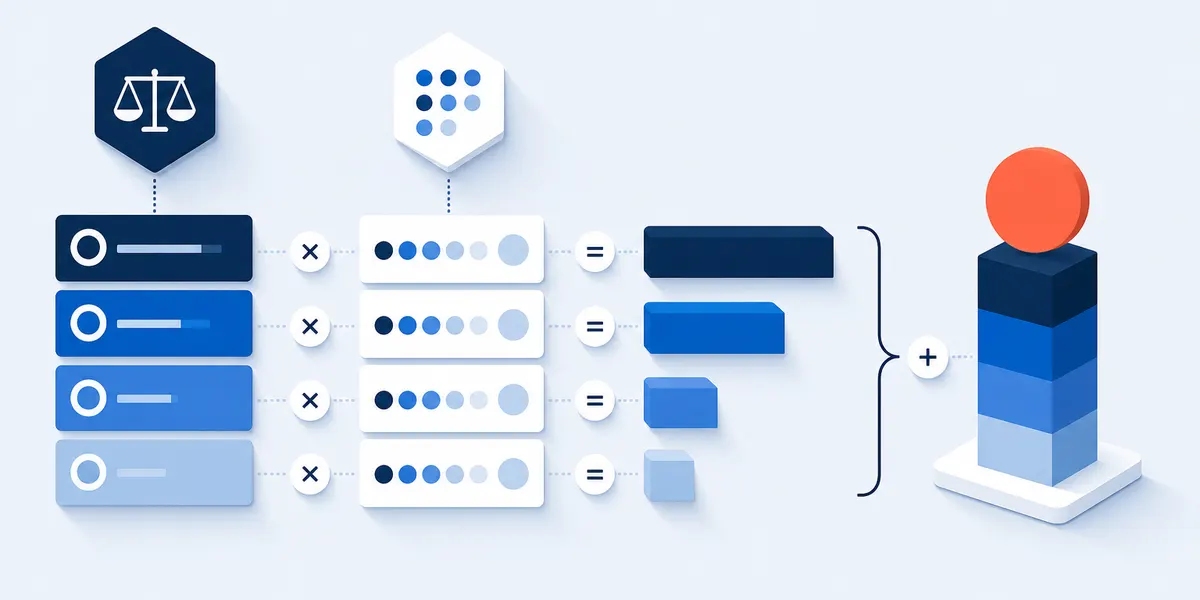
  3. Build a weighted scorecard that matches your priorities

    Use the same categories every time, then change the weights to match your environment.

    • Example weights (default): Usability 20%, Workflow fit 20%, Adoption intent 15%, Admin/governance 15%, Integrations 15%, Support/vendor 10%, Value 5%.
    • If security is the gating factor: shift weight from Value to Admin/governance and Integrations.
    • If end-user adoption is the risk: shift weight from Support to Adoption intent.

    Do this next: publish the weights before anyone sees results. That prevents gaming.

  4. Set stop-sign thresholds and decide what happens next
    • Stop-sign: low intention-to-use among frequent users.
    • Stop-sign: repeated workarounds on top workflows.
    • Stop-sign: any integration blocker marked as a deal-breaker by admins.
    • Stop-sign: permissioning, audit logs, or SSO rated as unusable by admins.

    Do this next: choose one path: roll out, extend pilot, reconfigure, retrain, or switch.

  5. Turn open-text into a mitigation backlog and an exec summary
    • Tag comments as: training, configuration, integration, performance/reliability, missing capability, or vendor support.
    • Write an executive summary: top 5 wins, top 5 risks, and a recommended action.
    • List the first 10 fixes with an owner (IT lead, admin, vendor) and a due date.

    Do this next: share results with respondents and state what will change.

Frequently Asked Questions

Can I use this survey for a pilot, a renewal review, and a vendor comparison?

Yes. Keep your benchmark core (SUS-style usability items and a short adoption-intent set) identical across time and vendors. Then swap only the workflow module and admin/integration module so each run matches the decision you are making.

How many responses do I need for a software pilot evaluation?

For small pilots, invite everyone and treat it as a census. Focus on role coverage: you want enough end users to reflect real workflows, plus enough admins to surface provisioning, SSO, and integration blockers. Always report counts by role so you do not hide risk in an overall average.

Should the software evaluation survey be anonymous?

Default to confidential so you can follow up on blockers and route fixes. Choose anonymous when people fear pushback or when the rollout is politically sensitive. In either case, state privacy clearly and separate tool feedback from performance management.

How do I compare vendors fairly using survey results?

Hold the basics constant: same question set, same pilot length, and the same training/onboarding baseline. Keep the respondent mix similar by role and usage frequency, and randomize tool order if the same person tests both. Use a weighted scorecard plus role-split views so admin risks do not get diluted.

How do I score the SUS block and interpret what the number means?

Score the 10 SUS items into a single 0-100 number using the standard scoring steps. Use benchmark ranges to interpret the level, then pair the SUS score with workflow-fit and adoption-intent results so you do not over-index on one metric.

How do we handle security/compliance in this survey without turning it into an audit?

Use the survey to capture perceived confidence and friction, not formal assurance. Ask about SSO experience, permissioning usability, and audit-log usefulness, then route detailed controls questions to admins and security with branching. Run a separate security risk review for formal sign-off.

FREE TO START -- NO CREDIT CARD REQUIRED

Create Your Software Evaluation Survey Template Now.

Start Building ➔